d0837296baef4fc14d667832c1a5215944b54a8f46af2d5c5c TipsS And TricksS: mobile
Showing posts with label mobile. Show all posts
on Friday, 6 December 2013
Brightest Flashlight app on Android was deceptive in sending user data to advertisers, says US FTC. Photograph: /public domain 


An innocuous-looking torch app for Android that has been downloaded more than 50m times silently shared users' locations and device IDs with advertisers, the company has admitted.
In a settlement with the US Federal Trade Commission (FTC), the maker of Brightest Flashlight Free admitted that the app's privacy policy "deceptively failed to disclose" that it was passing on location and device ID data to networks of advertisers.
The privacy policy said that "any" information collected by the app would be used by the company. But it didn't say that it would also send it to third parties.
Since its release in February 2011, the app has been downloaded between 50m and 100m times, according to data on the Google Play app store.
"When consumers are given a real, informed choice, they can decide for themselves whether the benefit of a service is worth the information they must share to use it,' said Jessica Rich, director of the FTC's consumer protection bureau. "But this flashlight left them in the dark about how their information was going to be used."
The FTC also said that the app gave users a false choice: "At the bottom of the license agreement, consumers could click to 'Accept' or 'Refuse' the terms of the agreement. Even before a consumer had a chance to accept those terms, though, the application was already collecting and sending information to third parties – including location and the unique device identifier."
That meant that advertisers could in effect have tracked users through their device ID and location to see what adverts they were clicking on - and even identified people through related information.
Under the settlement, the app will have to tell users how, where and when their data is about to be shared, and get their express permission to do so.
The case is the first where the FTC has zeroed in on unwanted sharing of geolocation data as part of its requirement to protect US consumer privacy.
Android apps tell users what information they will collect from users before they are installed - but do not give any explanation of what or how the information will be used, or why it is necessary to collect it. There is also no standard way to veto the collection of data or access to a machine function by an app.
The Play Store app, which has generally received good reviews - an average of 4.8 out of 5 - turns on all the lights on the device to create a torch. It also says that it offers "unobtrusive ads".
The developer, GoldenShores Technologies, also offers another app for choosing colours, which is also ad-supported. It has had far fewer downloads, totalling around 50,000. The FTC didn't say whether it is investigating that app.
Erik Geidl, who runs GoldenShores Technologies, has been ordered to delete any personal information that the app has collected. He is also required to tell the FTC if he changes his employment over the next ten years.
on Thursday, 5 December 2013
http://www.alexa.com/pro/subscription/configure?sid=1f6e9323-dc27-4edd-9bba-d8da10048b55#


Many android users don’t know much about the hidden features of android phones. Today we are sharing an article with secret android tricks and hidden features of android phones. Different versions of android versions support different set of android tricks, so try them all

1) Force reboot


Many times android users face a problem of freezing in mobile phone, in case your android phone is frozen, you can reboot it:

Just press Power Button+ Home Key + Volume up button simultaneously.


see also - How to unlock android pattern lock


2) Quick Google Access


Android phones is built primarily for the Internet, many of Android users don’t know that android phones provide a way by which we can access Google search in just a single click:

Press menu key and hold it for couple of seconds, it will launch the Google search.

3) Reboot Android in safe mode


As many computers, we can also reboot Android phones in safe mode. The latest Android- Jelly Bean version provides an option to reboot in safe mode, if something goes wrong.
To reboot your android in safe mode, follow the below given instructions.

*Long press the power button
*Long press on the power off option.


see also - Wi Fi password hack using Android Phones

Android phone will show a confirmation message about rebooting it in safe mode, if we reboot android phone in safe mode then all the 3rd party application will be disabled. These applications can again be enabled when we reboot our phone normally. This is a great Android utility in case when, one of your 3rd party application is causing trouble for you and you want to hunt it.


4) Voice typing

Not all Androids have it, but if yours does, it is a pretty sweet feature. It’s available on latest versions. While typing a mail or a message, look at the space bar. If you see a mic icon there, you can tap it and Android will convert your speech to text. It won’t be absolutely correct so you’ll have to make changes.

see also - Top Features of Android JellyBean

5) Call a contact with just a single tap


I’m sure you are aware of the fact that you can add app icons to your home screen. Just like those app icons, you can add contact icons to the screen as well. To add a contact icon, long press the empty space on home screen. You’ll see a popup menu. Select Shortcuts>Contact. Now go through the contact list and tap on the person you want to add there.


see also - Run Android Apps on Pc


6) Unlock android phones by face detection

In the jelly bean version, Android provides a way by which android phone can be unlock using face detection, to make this feature more secure, Jelly Bean version added another layer of protection in which Android phone can be unlocked only when the face is matched as well as we have to blink eyes in order to unlock phone. The Above tricks n tips are provided by IHA.Blinking eyes tells the android security system that person is live and it’s not an illegal attempt of unlocking using a still image.
To activate this:

Go to Settings > Security > Screen lock > Face unlock.

see also - 30+ secret codes of Android phones


7) Get detailed information about phone status

We can get the detailed statistics like phone information, battery information, usage statistics and WiFi information by just dialing *#*#4636#*#*

This is a handy USSD to get the details about battery usage, DNS check, Ping, Application time usage time and so on.


8) Amazon App Store

This app store is trusted, AND it gives one premium app for free each day. Check this store to download paid apps for free.
Want more cool Android tips and tricks? Keep watching this space for more. And don’t forget to leave your comments in case you have any questions/problems with your Android.
see also - Top 10 Most Popular Android Apps


9) Download Non-Playstore apps


Google Playstore has tons of apps, but if you still want more apps, there are other stores out there as well. Though Google Playstore is safer (I don’t know how true that is because many apps of Playstore have been found to be infected), if you want, you can open your options to other app stores as well. To do this, go to Application settings, and check the option that says “Unknown Sources”.  But make sure you download apps from only trusted sources.

10) Special characters


Want to quickly access special characters? No need to switch keyboards to type comma and slashes- just long press the period key and you’ll see a popup with all the recent characters.


on Thursday, 28 November 2013
top 5 travel apps
image credit www.lifehacker.com


Whether you're hitting the road or taking to the skies this travel season, you could do with a digital companion to help you plan your itinerary, make sure your tickets and connections are all lined up, and that you have plenty of time to do everything you want (or need) to do while you're traveling. This week, we're looking at five of the best travel planning apps or services, based on your nominations. 

1.Tripit

Tripit travel apps
image credit http://www.independent.co.uk

This clever little app turns your smartphone into a pocket-sized PA. Just forward all your flight, hotel and car rental reservations to Tripit and it creates a digital itinerary for your trip that you can print out for yourself or share. A must download for business travellers.
IOS and Android, free


2. TouristEye


TouristEye travel apps

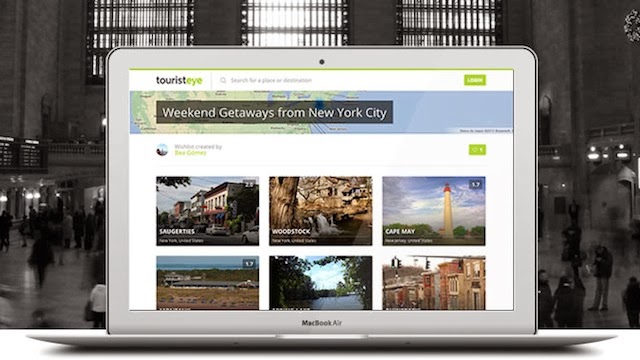
TouristEye is a little different; instead of helping you organize your trip or helping you find the best prices and options for your trip, it helps you build a "wishlist" of destinations where you'd like to travel and experiences you'd like to have. It doesn't have to be as fancy as a once-in-a-lifetime trip, either: the app is great for planning your annual family vacation (if you get to take one, that is), or if you want to just take a few day trips here or there. Of course, you can build your bucket-list of places you want to see before you die, and you can share that list with friends or family and collaborate with them on them. They can add waypoints and things to check out in the area, specific things to do when you're there, and together you can plan a trip together. Then, when you're on the road, you can look back over those plans with detailed information, links, maps, and more.

3. TripCase

TripCase travel apps

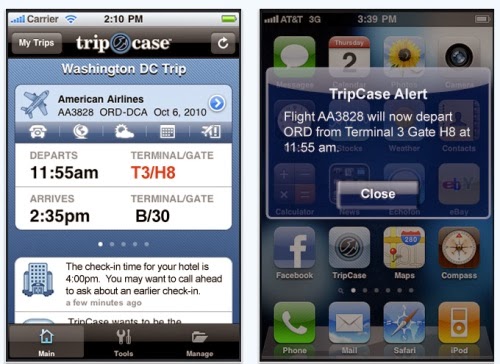
Among the new features in TripCase Pro, a product from Sabre Holdings, is adding seat maps with available seats; turn-by-turn driving directions from locales within your itinerary; SMS flight alerts within the TripCase application; flight search up to one year in advance, and sharing of full travel itineraries with assigned recipients. 

TripCase Pro is available for free through Oct. 31, and a fee will be charged thereafter. Pricing will be $9.99 per month or $69.99 for an annual subscription. Users can click the Go Pro option in the free TripCase apps for iPhone, Blackberry and Android to get more information. The introduction of TripCase Pro coincides with the release of TripCase 2.0. TripCase says enhancements to its latest version of its free app include the ability to select contacts to receive flight alerts, social networking functions, the ability to access all travel tools from one screen, and easier use of maps to plot locations and events in your itinerary. A TripCase spokesperson claims the free version of the app, which will still be available, offers certain features, such as flight alerts, that some competitors only make availble in their premium versions.


4. TripAdvisor


TripAdvisior travel apps

TripAdvisor® is the world's largest travel site*, enabling travellers to plan and have the perfect trip.  TripAdvisor offers trusted advice from real travellers and a wide variety of travel choices and planning features with seamless links to booking tools. TripAdvisor branded sites make up the largest travel community in the world, with more than 260 million unique monthly visitors**, and over 100 million reviews and opinions. The sites operate in 34 countries worldwide, including China under daodao.com. TripAdvisor also includes TripAdvisor for Business, a dedicated division that provides the tourism industry access to millions of monthly TripAdvisor visitors.

5.WorldMate


worldmate travel apps


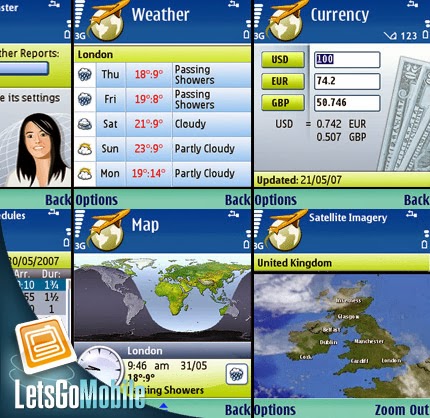
WorldMate, the popular travel planning and organizational service, has expanded its mobile reach onto the iPhone. The two different versions of the app, which were released late Tuesday night (one free, and a premium version that costs a hefty $19.99), give travelers tools to create and track travel itineraries including flights, hotel reservations, rental cars, and any appointments along the way.

The two versions of the app offer identical functionality for core parts of WorldMate's service, like a flight search tool, world clock list, currency conversion, and a heads-up display on what's on your schedule. However, the paid "gold" version comes without any kind of advertising. Feature-wise, it also adds niceties like an automatic flight status checker that, with the soon-to-be-released iPhone OS 3.0, will send you an alert if there's a delay or cancellation of your flight. It also plugs into Google Maps to tack together a rich map with all the places you're visiting on your trip.
Until it gets the live notifications, users of both versions will simply have to use the one-click "check flight status" link. This checks information against WorldMate's delay and cancellation tracker. It also lets you know about any last-minute gate changes.


on Friday, 18 October 2013
Hey, hey, hey you wanna crack neighbor’s super fast wifi ? How to Hack wifi Password using Android devices They must have password protected internet connection otherwise you won’t be reading this post isn’t it !! ha ha ha...


          Cracking wi-fi password is really not good considering your using the services paid for by others. But in this article, is an eye-opener that its really easy to crack wi-fi nowadays, using these gadgets. Hope internet providers will find a way to correct this. This is actually the reality happening. It is really on the discretion of the user.


Step 1 :

          The term Monitor mode provides you a facility to monitor every traffic going through your connection and how many devices are connected to it. But this mode can also be used for other purposes.

          By Capturing Data Packets on a network in monitor mode lets you to crack WEP Key.


Step 2 :

          Adding Monitor mode to Android Device you need to know the right chip-set and download that particular one from here Google Code  Modified Firmware on particular chip-set used in majority of android devices
 i.e Nexus one & Galaxy S III .


Step 3 :

          Once you downloaded that particular code it would be easier and simpler to Extract the ZIP file then configure files after running the setup. There are many instructions and step by step guide for your specific android device on there official blog.


Step 4 :

          After it is done check out video tutorial to learn how to hack WEP Key.

on Friday, 11 October 2013
Here are the 15 Most Popular Game Sites as derived from our eBizMBA Rank which is a constantly updated average of each website's Alexa Global Traffic Rank, and U.S. Traffic Rank from both Compete and Quantcast"*#*" Denotes an estimate for sites with limited Compete or Quantcast data. If you know a website that should be included on this list based on its traffic rankings Please Let Us Know.
the research is done by:- http://www.ebizmba.com
1 | Zynga163 - eBizMBA Rank | 27,000,000 - Estimated Unique Monthly Visitors | 47 - Compete Rank | 181 - Quantcast Rank | 260 - Alexa Rank.
Most Popular Game Websites | Updated 10/1/2013 | eBizMBA
2 | Pogo
251 - eBizMBA Rank | 16,500,000 - Estimated Unique Monthly Visitors | 69 - Compete Rank | 173 - Quantcast Rank | 511 - Alexa Rank.
Most Popular Game Websites | Updated 10/1/2013 | eBizMBA
3 | Yahoo! Games
279 - eBizMBA Rank | 16,000,000 - Estimated Unique Monthly Visitors | 98 - Compete Rank | *460* - Quantcast Rank | NA - Alexa Rank.
Most Popular Game Websites | Updated 10/1/2013 | eBizMBA
4 | Y8
351 - eBizMBA Rank | 12,000,000 - Estimated Unique Monthly Visitors | 203 - Compete Rank | 589 - Quantcast Rank | 260 - Alexa Rank.
Most Popular Game Websites | Updated 10/1/2013 | eBizMBA
5 | BigFishGames
530 - eBizMBA Rank | 9,000,000 - Estimated Unique Monthly Visitors | 220 - Compete Rank | 392 - Quantcast Rank | 979 - Alexa Rank.
Most Popular Game Websites | Updated 10/1/2013 | eBizMBA
6 | MiniClip
572 - eBizMBA Rank | 8,500,000 - Estimated Unique Monthly Visitors | 604 - Compete Rank | *NA* - Quantcast Rank | 539 - Alexa Rank.
Most Popular Game Websites | Updated 10/1/2013 | eBizMBA
7 | AddictingGames
701 - eBizMBA Rank | 7,500,000 - Estimated Unique Monthly Visitors | 117 - Compete Rank | 557 - Quantcast Rank | 1,429 - Alexa Rank.
Most Popular Game Websites | Updated 10/1/2013 | eBizMBA
8 | Games
1,321 - eBizMBA Rank | 4,100,000 - Estimated Unique Monthly Visitors | 331 - Compete Rank | 915 - Quantcast Rank | 2,717 - Alexa Rank.
Most Popular Game Websites | Updated 10/1/2013 | eBizMBA
9 | GameHouse
1,380 - eBizMBA Rank | 4,000,000 - Estimated Unique Monthly Visitors | 289 - Compete Rank | 746 - Quantcast Rank | 3,106 - Alexa Rank.
Most Popular Game Websites | Updated 10/1/2013 | eBizMBA
10 | PopCap
1,501 - eBizMBA Rank | 3,900,000 - Estimated Unique Monthly Visitors | 491 - Compete Rank | 978 - Quantcast Rank | 3,033 - Alexa Rank.
Most Popular Game Websites | Updated 10/1/2013 | eBizMBA
11 | FOG
1,520 - eBizMBA Rank | 3,800,000 - Estimated Unique Monthly Visitors | 946 - Compete Rank | 1,677 - Quantcast Rank | 1,936 - Alexa Rank.
Most Popular Game Websites | Updated 10/1/2013 | eBizMBA
12 | Shockwave
1,696 - eBizMBA Rank | 3,700,000 - Estimated Unique Monthly Visitors | 373 - Compete Rank | *NA* - Quantcast Rank | 3,018 - Alexa Rank.
Most Popular Game Websites | Updated 10/1/2013 | eBizMBA
13 | Iplay
1,897 - eBizMBA Rank | 3,400,000 - Estimated Unique Monthly Visitors | 358 - Compete Rank | 652 - Quantcast Rank | 4,680 - Alexa Rank.
Most Popular Game Websites | Updated 10/1/2013 | eBizMBA
14 | FreeRideGames
2,688 - eBizMBA Rank | 2,200,000 - Estimated Unique Monthly Visitors | 562 - Compete Rank | 593 - Quantcast Rank | 6,910 - Alexa Rank.
Most Popular Game Websites | Updated 10/1/2013 | eBizMBA
15 | Bored
3,706 - eBizMBA Rank | 1,200,000 - Estimated Unique Monthly Visitors | 782 - Compete Rank | 4,047 - Quantcast Rank | 6,289 - Alexa Rank.
Most Popular Game Websites | Updated 10/1/2013 | eBizMBA.
thanks for visiting here..
on Saturday, 5 October 2013
.

LG mobile phones


So, Let's go for it...

2945#*#   ---To access the mode of the set
2945*#01*#   ---Use to display the secret menu of LG mobile set
*8375#   ---Use to display the mobile software version
*#06#   ---To display IMEI number
2945#*#   ---To set the default settings of mibile phone
1945#*5101#   ---Use to mange sim lock menu for LG (B1200)
2945#*5101#   ---Use to mange sim lock menu for (LG 5200, 510W)
2947#*   ---Use to manage sim lock menu for (LG500, 600)
47328545454#   ---To set default  settings of mobile
*#07#   ---To display the SW and IMEI number
277634#*# or 47328545454#   ---To remove the security codes of LG set
*6861#   ---To recount checksum
##2342   ---Apply to resets the set advanced settings
##786   ---Used to reset the mobile memory and life timer
##889   ---To enable the TTY
#PWR 668   ---To perform the Factory test


Apple


LOS ANGELES — 

Another issue erupted this week with Apple's newly overhauled iOS7 software, which runs the iPhone, iPad and iPad Touch. Messages sent from phone to Apple devices and computers — iMessages — aren't all being sent or received.

Apple confirms the issue, and says it's working on a solution.

"We are aware of an issue that affects a fraction of a percent of our iMessage users, and we will have a fix available in an upcoming software update," says Apple in a statement. "We apologize for any inconvenience this causes impacted users."

The iMessage program lets Apple device and computer users send texts for free over Wi-Fi. And unlike most text programs, Apple's advantage is that texts can go from phone to phone, phone to iPad and iPod and even to the Mac computer too.

Folks who switched to iOS7 also have complained of dizziness from the new animated graphics and a general slowdown of their device on older models of the iPhone.
on Wednesday, 18 September 2013
 At their annual developers’ conference in June this year Apple finally unveiled iOS 7: the most dramatic visual overhaul of the company’s mobile operating system in its six year history.

Starting from tomorrow the new software will roll out onto Apple’s devices, though only from the latest models onwards, starting from the iPhone 4, iPad 2 and latest generation iPod (scroll down to the bottom of this article to see a chart of all compatible devices). In addition, iOS 7 will of course be available on the new iPhone models – the 5S and 5C – from their release date on 20 September.

The update is a big change for Apple; firstly in terms of design language (it’s ‘out with skeuomorphs’ and ‘in with flat design’, as the parlance goes) but also corporate responsibility (this is the first iOS overseen by Jony Ive, previously Apple’s lead industrial designer).

The update will be available to UK Apple users from 6pm this evening, with the download easily found under your iPhone or iPad's setting menus. Just navigate from 'General' to 'Software update' and you're all ready! Might be best to update over Wi-Fi to save on your data charges though.

It's also a smart idea to back-up your device just in case something goes wrong (small chance - but better safe than sorry). You can do this via iTunes or iCloud - head over to Apple's support site for more detailed instructions.

Meanwhile, let's have a look at what new functionality is being added with the update:

The new look

Although the new look of iOS has been covered pretty exhaustively (click here to read our own, pretty exhaustive, take on the flat 'movement') it’s safe to say that the design is a simpler iOS.

Versions 1 through 6 of the operating system embraced 3D effects from textures to drop shadows, and those inimitable skeuomorphs (‘metaphorical’ bits of design that refer back to older consumer products – think the leather stitching on Apple’s diary), but iOS 7 has dropped these in favour of flat, colourful icons and layered design.

The control center is key to introducing 'layers' to iOS 7; you can swipe it up at any time, with the 'frosted glass' effect reminding you you're only a step away from whatever you were previously doing.

Extra control


One of the most obvious new layers in navigating iOS 7 is the control center (accessed by swiping up from the bottom of the screen at any time) a long-needed addition to Apple’s smartphones. Android users have had quick access to toggled settings (Wi-Fi, Airplane mode and Bluetooth for example) for a while now, though Apple is expanding with sliders for volume and brightness, basic music controls and quick access to the camera.

Building on this greater sense of control is an improved approach to multi-tasking (again, some might note, a long-time Android strength) including the ability to double-click on the home button to bring up full-page previews of your currently running apps.

A subtler subtle change is how the new iOS will handle data downloads, with users now offered the option to trigger automatic data downloads from messages and emails instead of having to wait till the moment you load the relevant app. Downloads are also lumped together and only start when you’re in a good signal area – saving your phone’s battery by  having it fruitlessly searching for non-existent data connections.

The overhauled Photos app - with the new automatic albums on the left and the redesigned camera interface on the right.

Better photos, better photo albums


As with the overall look of iOS 7 the camera app has had a striking makeover, with a new minimalist black and white layout and its own all-caps font. Users can now take pics in a suspiciously Instagram-like manner, with filters built as well as a square-format offered (I would excuse Apple for this by saying that you can’t really patent a square – but Apple did try to patent a square with rounded corners).

Other software changes include the addition of Moments, Collections and Years for the Photo app – automatic groupings of your photos that will create albums that match, say, a day and a location so you get all the pics from your weekend trip to Brighton in one place.

The real changes to the camera though will take the latest iPhone to unlock. The 5S offers HD video recording at 120 frames per second and slow-mo playback; a burst capture mode that takes up to 10 frames a second; and True Tone flash – a dual amber and white LED flash that makes for more accurate colours and natural-looking skin tones.

The re-designed Safari includes better navigation through tabs and pages, as well as a new Smart Search field (to auto-complete search terms) and an iCloud Keychain, to store all your passwords in one place.

Going on a web Safari


Apple’s in-house browser Safari does pretty terribly in terms of market-share on desktops and laptops, but it’s always been one of the best – if not the best – mobile browser. Along with the rest of the OS it too gets a visual update, with new minimalist icons for navigation, but there are also changes to how you manage tabs and bookmarks.

In recognition of the complex multi-tasking users now demand from their mobiles the Safari browser is no longer limited to eight tabs, and switching between windows has been revamped with a 3D scrolling effect. Bookmarks get the best changes though; with a new function that collates updates from Twitter streams and the like, meaning you don’t have to keep switching about with your apps.

AirDrop shows contacts nearby - simply click their portrait and select a file to send (pictures or a phone number for example). Apple promise everything will automatically slot into the right place on your handset.

AirDrop's made for swapping


It's been around on MacBooks and iMacs for a while, but with iOS 7 AirDrop is finally going mobile. It's essentially a built-in app for swapping files with other nearby Apple users. The interface looks incredibly simple and easy to use, but we've yet to see how reliable the service is.

Files are shared via Bluetooth or Wi-Fi and users can toggle their visibility on and off. You can automatically be seen by people in your contacts list but - if you want to live a little dangerously - you can opt in and be visible to anyone in the vicinity. Turning it on and off is easily done via the Control Center.

And of course, the update will also be coming to iPads and iPad minis.

Conclusion


This list is a pretty brief one but it does indicate that iOS 7 is more than just a visual makeover, it’s a fantastic update of the iOS system. And this is without even mentioning a wide array of other changes including Siri updates (male and female voices! Integrated Wikipedia and twitter results!); the introduction of iOS in the Car (though we’ll have to wait for manufacturers to really integrate this better); and the launch of iTunes radio (a free streaming music service to rival Spotify, Rdio and the like - only available in the US for now though)

 
on Sunday, 15 September 2013
Hi. .Guys todays i brings awesome apps with u about by which you can recover the dream.You probably don’t remember what you dreamed about last night.

A new apps called Shadow is attempting to change that, offering an easy way for you to record your dreams, track them, and discover what they might all mean.

According to Shadow, 95% of dreams are forgotten if they’re not recorded shortly after waking up. It aims to combat that by working first as an alarm clock that gently wakes you up through escalating alarms, transitioning you smoothly from sleeping to being awake.
Once you wake up, the app instantly has you type or speak answers to questions about your dreams, recording those memories while they’re still fresh in your mind. The longer you use the app, the more information you’ll be able to record, and the better your chances will be to discover patterns within those dreams.
Shadow is currently in invite-only beta. You can sign up to give the app a try on its website  

here is some of its screen shots...for u make ur dream so easy

Step 1:- this is the welcome screen which brings dream world...


Step 2:- it dedicates the problem with person that it lost of 95% of his dream. just after wake up


Step 3:- how an innovative alarm that helps you to record and remember your dreams..


Step 4:- Any thing happens in your dream its records that moments to make you wake up 


Step 5:- explore your dream to content ,context and sentiment that you and other are experienced


Step 6:- Enter your email address for your dream make together is reality and make request invite


AT last :- Discover shadow make thanks you for requesting an invite..check your email id for what to do now


do you really feels wonder that how this is possible that any one can record dream...its just like any hollywood animation picture climax but you are in the digital era where every thing may be possible if you do so..this is my consideration make it visit and do it proceed
   

No doubt that any one doesn't like this so please leave us comment for further details u have problems...